← Selected Work
The Vibe-Coding Builder

No Code, Only Vibes

The NLGJ Success Planner and the Color Code assessment platform
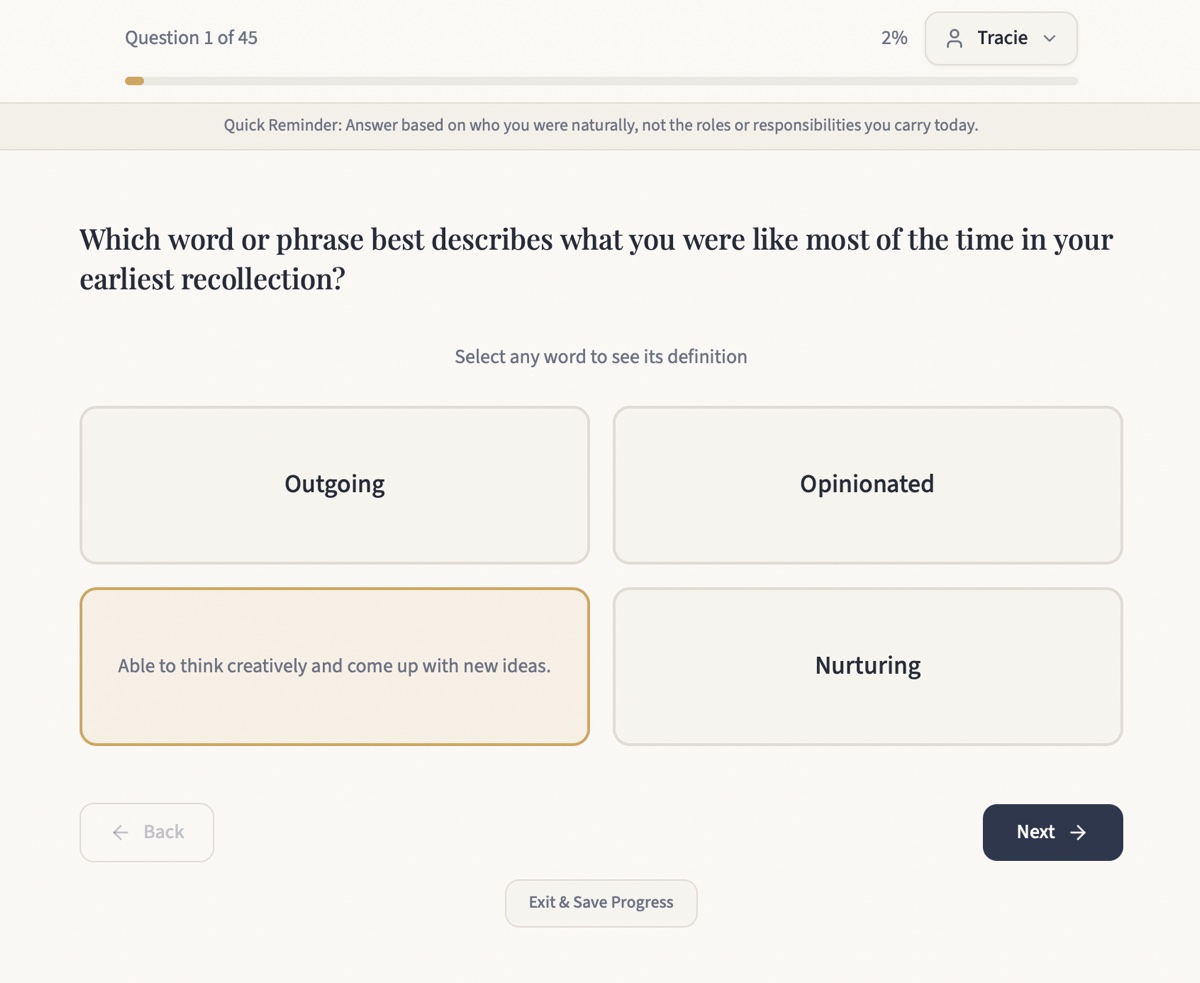
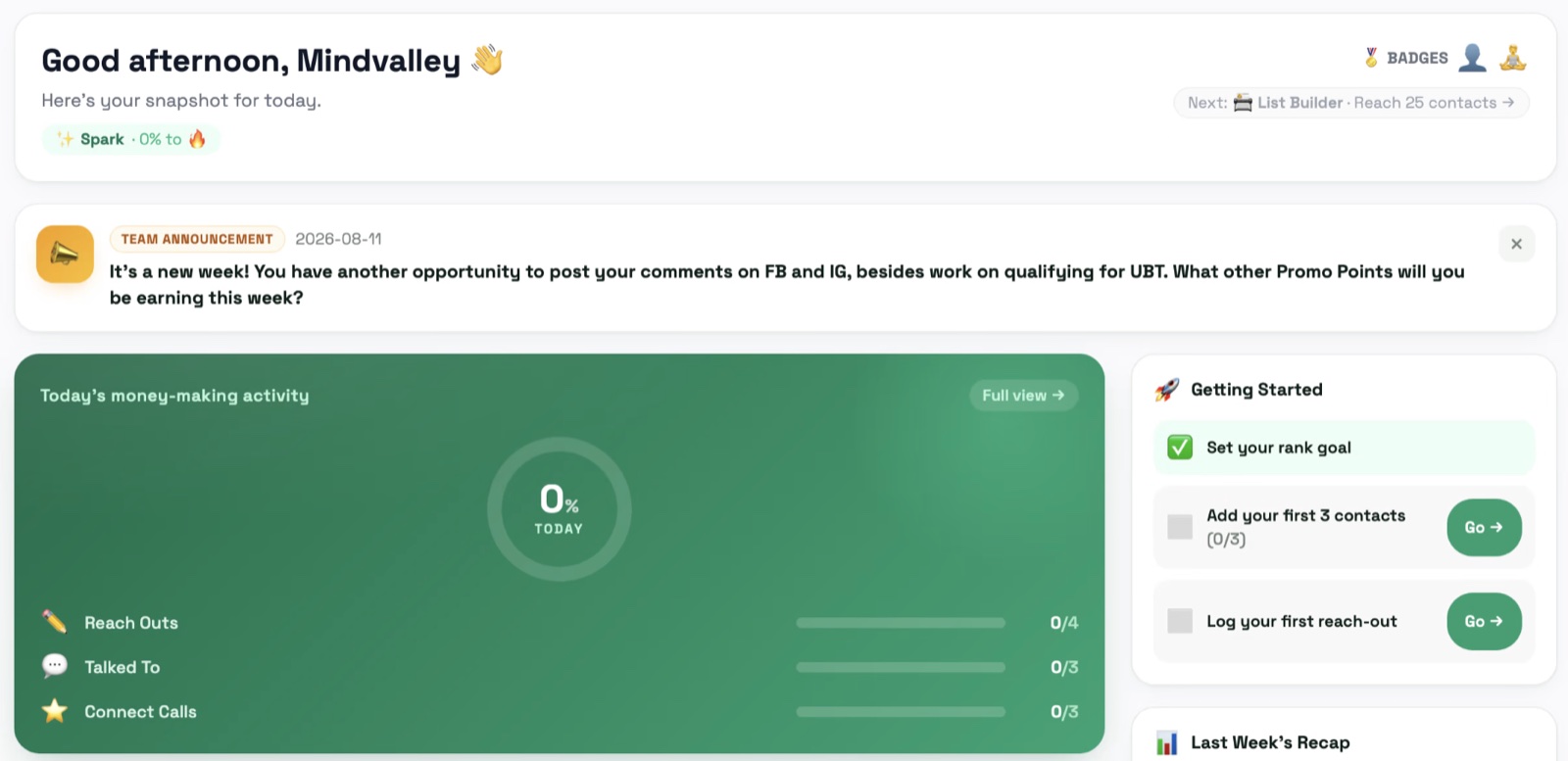
The planner dashboard: the day's three activity rows against their goals, a team announcement, and the getting-started checklist
What a partner sees when they open it. The three rows are the day's work against the day's goals, and they fill in as each one is logged.
Why this is not on the Purium page

This could have sat inside Bringing AI to Purium just as easily. The leader hierarchy lives in the data model, so activity rolls up through the structure the business actually has, announcements reach the whole team inside it, and a leader sees their own group without ever seeing anyone's private contacts. It is entered here instead because of how it was built rather than who it serves.

The Idea

Effort nobody could measure against the goal it was meant to reach.


My Brand Partners were tracking their daily activity across notebooks, spreadsheets and memory, so everyone was working hard and nobody could see whether any of that work was pointed at the rank they said they wanted.

Rank advancement runs on volume thresholds and qualification windows that live in a compensation plan document, and a partner logging reach-outs in a notebook has no way to connect the two.

The Success Planner holds both. "Is what I did today moving me toward my goal" now has an answer on the screen rather than in someone's head.

7,460
Lines in one file
No build step
11
Tables locked
Owner only
0
Lines of code
I wrote myself
v6.11.3
In beta
With my team
01   What It Does

Built around the compensation plan, not around a generic to-do list.


Every feature here exists because a partner asked the same question twice, so nothing in it is a capability looking for a use.

🎯Goals

Goal and volume tracking

Targets derived from the real compensation plan rather than an approximation, including the 500 GQV monthly qualification that governs the Lifestyle Bonus and Bonus Pool. A partner sees the threshold, where they are against it, and how much of the month is left.

Comp plan derived
📋Activity

Daily logging

Reach-outs, conversations and per-category promotion logging, entered in the shape the work happens rather than as a generic task list. This is the input side that the goal maths reads from.

The daily input
📊Leadership

The organization, built into the tool

The leader hierarchy is in the data model, so reporting rolls up through the structure the business actually has rather than a flat list. Announcements reach the whole team from inside it, and partners earn badges as they hit the thresholds that matter. A leader sees their own group's activity without ever seeing a partner's private contact list, and that boundary is enforced in the database rather than in the interface, which is the subject of the next section.

Hierarchy  ·  Team messages  ·  Badges  ·  Roll-up reporting
📱Delivery

Installs like an app, updates like a site

A progressive web app with a service worker set network-first for HTML, so a partner who installed it in March is not still running March's version in July. Data exports to a spreadsheet, and the version number shows in the header and at sign-in so a support question can be answered in one glance.

PWA  ·  Export  ·  Versioned
02   How It Is Built

One file, a real database, and a deploy folder that holds only what ships.


I have never written code, so Claude built this and I described what the business needed, then reviewed what came back the way I review anything my team depends on, which is how the section above happened.

LayerWhat
Build partnerClaude Code. No application code written by hand.
Front endA single index.html of roughly 7,460 lines on Tailwind, with no build step to go stale.
BackendSupabase: Postgres, Auth, and row-level security carrying every access rule.
Business logicThe Purium compensation plan, including the 500 GQV monthly qualification.
Offline and exportA service worker set network-first for HTML, a web app manifest, and spreadsheet export.
SecurityOwner-only policies on 11 tables, a privileged helper for the admin check, a role-change trigger, and a documented migration series through v6.11.3.
HostingNetlify, by dragging a clean folder that contains only the three files that ship.

That last line is a discipline rather than a detail. The working folder holds dozens of migration scripts and notes accumulated over months, and none of them belong on a public server. Shipping from a separate clean folder means the question of what is deployed has an answer you can see rather than one you have to remember.

Tech stack
ClaudeSupabasePostgres row-level securityNetlifyProgressive web appService workerSingle-file vanilla JSNo build step
03   The Second Application

The personality assessment that is not based on your behavior.


Hartman's Color Code asks what drove you before life taught you how to act, so its questions reach for earliest memory rather than current habit. I am a certified facilitator, and the platform my practice runs on is the second application I had built.

Any word in a question can be tapped for its definition, so nobody answers on a guess at what a word means. A session saves where it stops and resumes there. A finished assessment generates a full report to print or keep, and an admin side handles organizations, coaches, access codes, results and export.

45
Questions
Resumable, saved
4
Colors
Scored as a spread
7–10
Minutes
Start to report
0
Lines of code
I wrote myself

It went through the same pre-launch review the planner did, and what that review found is fixed. One application that survives review could be luck. The discipline is the part I would want judged.

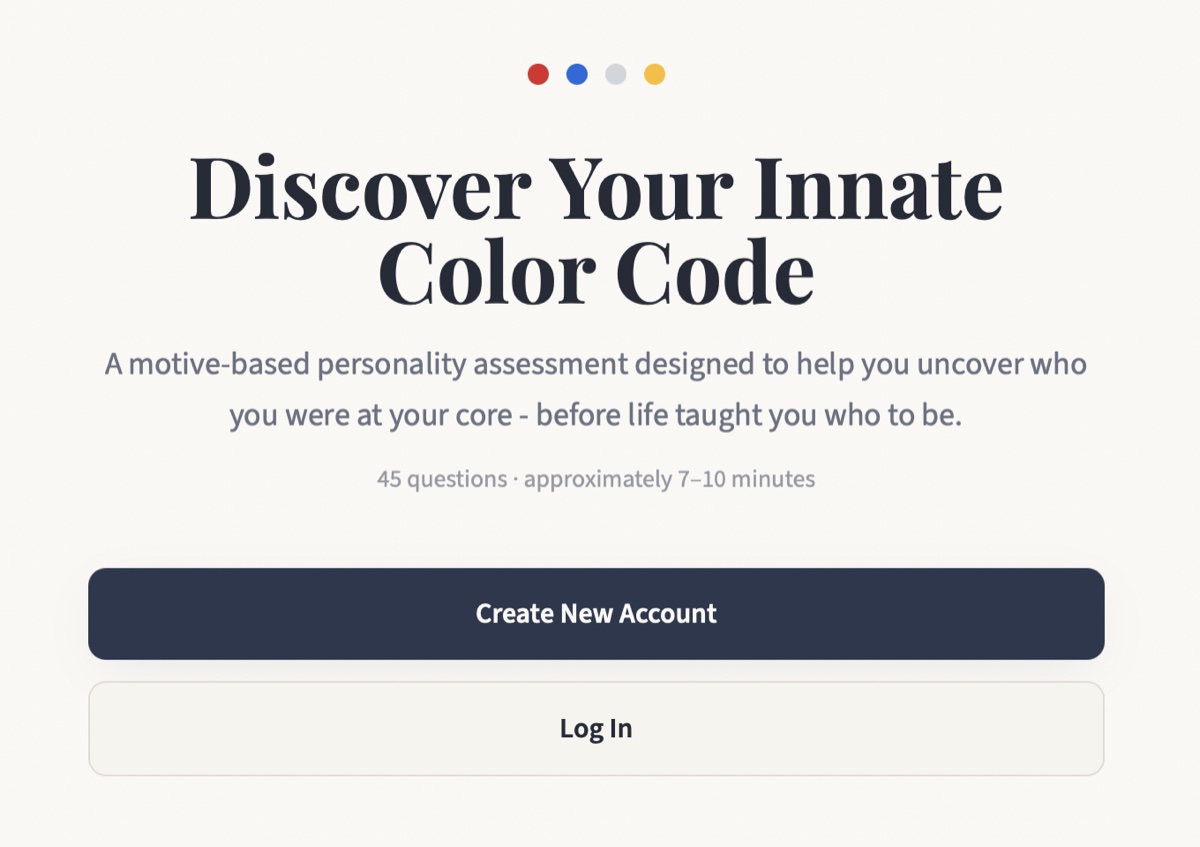
The assessment landing screen: Discover Your Innate Color Code, 45 questions, about 7 to 10 minutes
Where it starts. 45 questions, 7 to 10 minutes.
The Before You Begin screen, asking the taker to answer from earliest childhood memory rather than from who they have learned to be
The instruction the whole instrument rests on: answer from earliest memory, not from who you learned to be.
Question 1 of 45, with one option expanded to show the definition of the word it uses
Any word can be tapped for its definition, so nobody answers on a guess at what a word means.

Read a sample report →

Thank you for spending time with this.